







Broadcom’s move to a subscription model has triggered an exodus from VMware workloads. With exploding TCO, a shrinking partner ecosystem and various AWS offerings to sweeten the transition, many are ditching the Broadcom tax in favour of pay-as-you-go alternatives.
But we hardly need to tell you that: it’s why you’re reading.
In this piece, we look at:
- The many good reasons teams are making the move from VMware to AWS cloud (skip if your mind’s made up)
- The hybrid approach of using both MGN and AWS Transform (the most common workflow)
- How this changes if you require an agentless approach
Let’s get started.
Why teams are leaving VMware Cloud
The cost, the penalties, narrower options for assistance, bundles designed to extract yet more money, and an open exit.
VMware licensing costs
Broadcom has eliminated perpetual licences in favour of subscriptions calculated per CPU core. Crucially, they’ve set a “floor” of 16 cores per CPU. This means even teams running lean hardware are billed for a minimum of 16 cores per processor.
Renewal minimums and late penalties
From 10 April 2025, Broadcom raised the minimum VMware licence purchase to 72 cores (up from 16). If you renew late, there’s also a 20% penalty calculated on the first-year subscription price.
A shrinking partner ecosystem
On 4 February 2024, Broadcom ended VMware’s existing partner programs and incentives and shifted to an invite-only model. For customers, this translates into fewer partners to buy from, fewer managed options, and less choice in support options.
Bundle-first packaging
Broadcom has steered customers toward fewer, larger subscription bundles such as VMware Cloud Foundation (VCF) and vSphere Foundation (VVF). If you previously licensed a narrow set of components, the bundle shift forces a broader footprint and a higher bill to maintain workloads.
AWS has made the exit quite appealing
AWS now has two clear paths off VMware: AWS Application Migration Service (MGN) for lift-and-shift at scale, and AWS Transform for teams that want to move and modernise in the same motion. On top of that, AWS supports agentless vCenter snapshot-based migrations where you can’t install per-VM agents (more on this at the end of the piece), and runs migration programs that can include AWS credits to offset the move.
These programs are often delivered via AWS Partners (such as ourselves), with eligibility criteria and credit rewards changing over time. So, it’s worth checking the current terms at the time of reading. You can do this at AWS VMware migration programs.
If all or any of the above are pushing you to begin the migration process, you’ll want to take a look at…

The most common VMware migration to AWS option: the hybrid approach using both MGN and AWS Transform
Migrating virtual machines to AWS from VMware is best accomplished using a hybrid approach. This is, roughly speaking, because Transform is your cloud migration brain while MGN provides the muscle.
Transform handles the planning work up front, mapping dependencies and translating networking so you know what to build and in what order, while MGN does the execution work at scale by replicating VMs into AWS and driving test launches and cutovers.
What is AWS Application Migration Service (MGN)?
MGN is AWS’s lift-and-shift engine for VMware exits: it replicates server disks in an AWS staging area and then launches that state as EC2 for test and cutover. You control the target via launch settings (instance types, disks, networking, security groups, tags) and run repeatable waves across many VMs.
It’s strong at moving compute quickly with minimal change, but it won’t redesign your VPC, untangle dependencies, or act as a launchpad for serious modernisation.
What is AWS Transform?
AWS Transform is the agentic, AI-led layer designed to orchestrate the migration process.
Transform focuses on discovery and dependency mapping, translating VMware networking intent into an AWS design, and producing wave plans and build artefacts so the target environment is ready for execution.
How they work together
In most cases, teams will be using Transform and MGN together. It’s possible to use MGN only in cases where, for example, you have a small cloud estate that’s well understood. However, it’s more common to use MGN without Transform to migrate some of your VMware solutions that fit this description within a broader estate, while other, more complex workloads are discovered via Transform.
Since this is the more common use case, that’s what we’ll be focusing on today.
Other native AWS services commonly used in VMware Cloud to AWS migrations
- AWS Identity and Access Management (IAM): controls who can run migration actions and what they can change
- Amazon VPC (Security Groups, routing): defines the target network boundaries and traffic rules migrated workloads land in
- Site-to-site VPN or AWS Direct Connect: provides the connectivity path required for replication, testing, and cutover
- Amazon Route 53: enables controlled DNS cutovers and rollback-friendly traffic switching
- Amazon CloudWatch and AWS CloudTrail: monitoring plus audit logs for troubleshooting and change evidence during migration
- AWS Systems Manager: runs post-launch checks, scripts, and configuration tasks across waves without manual toil
How to run a VMware to AWS migration using Transform + MGN
Below is a practical, repeatable migration process for VMware workloads that combines AWS Transform (planning/orchestration) with AWS Application Migration Service (MGN) (replication, test, cutover).
1) Define scope and acceptance criteria
- Confirm the scope of the VMware migration to AWS (vCenter(s), clusters, folders/tags, and environments)
- Define wave-level acceptance criteria for migrating virtual machines (test pass conditions, cutover conditions, rollback triggers)
- Record constraints that affect cloud migration (maintenance windows, freeze periods, RTO/RPO, regulatory requirements)
This step sets the boundary of the migration and establishes what “success” means for test and cutover, so later waves can be executed consistently.
2) Prepare a minimum viable landing zone in AWS cloud
- Establish the target account structure using AWS Organizations/Control Tower (where applicable)
- Create least-privilege roles and permissions for operators using IAM
- Enable encryption standards using KMS
- Enable audit logging using CloudTrail (to evidence changes during the migration process)
The objective here is a usable AWS foundation for migration activity, with permissions, encryption, and audit logging in place from the start.
3) Implement target networking for migration and testing
- Create the target VPC, subnets, route tables, and security groups using native AWS services
- Define separate subnets for test launches vs cutover launches (to avoid unintended production impact)
- Define DNS approach for testing and cutover using Route 53 (including TTL policy and rollback approach)
This is where you define the network shape the migrated servers will land into, including a safe test area and a production-ready cutover area.
4) Establish connectivity between VMware Cloud and AWS
- Implement a connectivity path using site-to-site VPN or Direct Connect
- Validate bandwidth and latency against replication requirements for virtual machines
- Confirm firewall and routing rules required for tooling access and replication traffic
Connectivity is the basic prerequisite for replication, testing, and cutover; if it is unreliable, everything downstream becomes harder to validate.
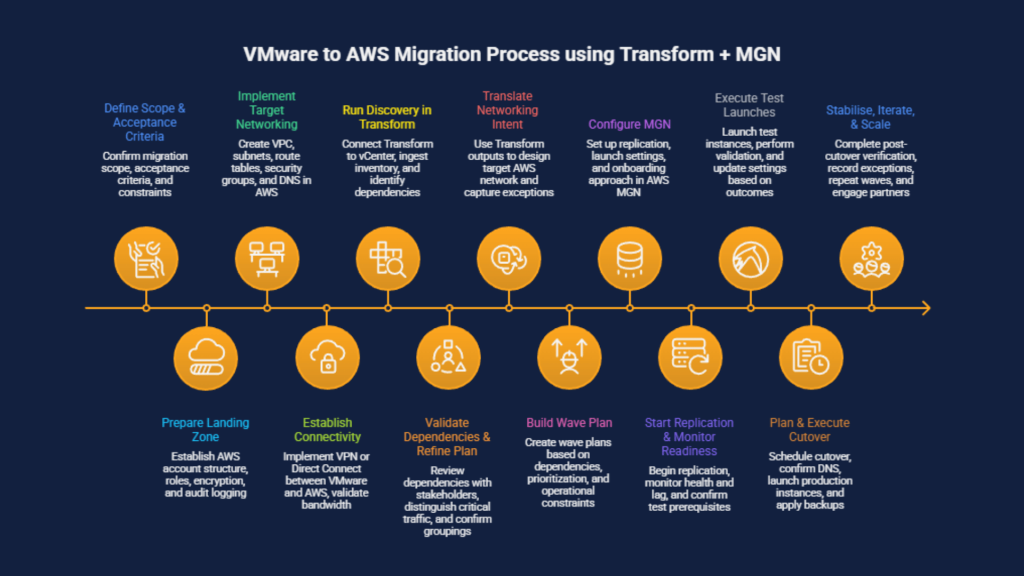
5) Run discovery in AWS Transform
- Connect Transform to VMware Cloud / vCenter and ingest inventory of VMware-based workloads
- Use Transform outputs to establish initial application groupings and dependency views
- Identify shared services early (identity, DNS, monitoring, backup, licensing) that may influence sequencing
Discovery converts your VMware estate into an actionable inventory and an initial view of dependencies that informs wave planning.
6) Validate dependencies and refine the plan
- Review Transform dependency mapping with application owners and operations teams
- Distinguish critical dependencies from non-critical traffic (for example, monitoring, patching, administrative access)
- Confirm groupings that must move together to reduce cutover risk
This step turns Transform’s initial dependency picture into something operationally trustworthy before you start executing at scale.
7) Translate VMware networking intent into an AWS design
- Use Transform network translation outputs to define the target network layout and security controls in AWS
- Capture exceptions that require explicit handling (legacy ports, hard-coded IP dependencies, non-standard routing)
- Align target network controls to the minimum required for the first migration waves (expand later if needed)
The aim is to convert what currently works in VMware networking into an AWS network design that supports equivalent communication paths.
8) Build a wave plan suitable for execution
- Create wave plans based on dependency groupings plus prioritisation criteria and operational constraints
- Select a low-complexity first wave (small early waves, then increasing complexity over time)
- Define per-wave runbooks: test plan, cutover plan, rollback plan, and validation checklist
Wave planning packages the work into repeatable units that can be tested and cut over without expanding the scope of each migration event.
9) Configure AWS Application Migration Service (MGN) for execution
- Configure replication settings and staging defaults in AWS Application Migration Service
- Configure launch settings (network placement, security groups, disks, tags) prior to test/cutover launches
- Select the onboarding approach for source virtual machines:
- Agent-based replication, where permitted
- Agentless vCenter snapshot-based approach, where agent deployment is restricted (name-check only; detail later)
This step standardises how servers will be replicated and launched, so test and cutover outcomes are predictable across waves.
10) Start replication and monitor readiness
- Start replication for the selected VMware workloads and wait for steady-state replication
- Monitor replication health and lag using CloudWatch (name-check; detailed metrics later)
- Confirm prerequisites for test launch (subnet readiness, security group rules, access pathways)
Replication is the point where the plan becomes executable; readiness confirms the wave is in a stable state for testing.
11) Execute test launches for the wave
- Launch test instances for the wave using MGN
- Perform structured validation:
- Network reachability and name resolution (VPC, Route 53)
- Authentication and authorisation paths
- Service health checks and configuration verification using Systems Manager (name-check)
- Monitoring and logging verification using CloudWatch/CloudTrail (name-check)
- Update launch settings and network controls based on test outcomes, then repeat the test cycle until criteria are met
Testing validates that the replicated servers behave correctly in the target network before any production cutover is attempted.
12) Plan and execute cutover
- Schedule cutover at a defined date/time and align stakeholders and change controls
- Confirm DNS change steps and rollback approach using Route 53
- Execute cutover launch in MGN and complete acceptance tests
- Apply backups where required using AWS Backup (name-check)
Cutover is the controlled transition from source to target, using the runbook and validation criteria established earlier.
13) Stabilise, iterate, and scale
- Complete post-cutover verification and monitoring baselines (CloudWatch)
- Record exceptions and remediation work for later waves (including candidates for modernisation in AWS Transform)
- Repeat wave planning and execution, keeping multiple waves prepared in advance
- Engage AWS partners where additional capacity is required for migration execution, validation, or network/security review
This step focuses on making the next waves easier by carrying forward working templates, resolved issues, and proven checks.
What if I need agentless replication?
For some, a strict security or change control policy (or less common technical restrictions) makes per-VM agent installation impractical. Usually, this is to do with approvals, access and/or downtime risk.
However, as of 2024, VMware customers on vCenter 8 are supported by AWS’s agentless replication in MGN.
Although this is not preferred as the default, if you find yourself in this position, don’t fear. Simply amend steps 9-11 above as follows:
- Step 9 (Configure MGN): add deployment of the MGN vCenter Client in vCenter, with outbound connectivity to vCenter and AWS MGN endpoints
- Step 10 (Start replication): Instead of installing agents, discover/select eligible VMs via the vCenter Client and start snapshot-based replication from there
- Step 11 onwards (Test and cutover): no change, as you still run test launches and cutover launches from MGN using the same launch settings and validation approach
How we can help
As AWS Advanced Partners and holders of the Migration Competency, Just After Midnight is perfectly placed to help you move your VMware workloads to AWS cloud.
We’ve helped countless teams achieve the cost savings, readiness for disaster recovery and operational improvements that come with migrating to a modern, cloud-native environment – all with minimal disruption.
To find out more about how we could help you migrate your VMware workloads to AWS, or for anything else, just get in touch.