







Every month, cloud bills land on desks (or in Slack channels and Teams chats) and elicit the same collective gasp. During our Well-Architected Reviews, I’ve sat with many customers trying to decipher why a bill jumped 20% when traffic only went up by 5%.
The truth is, AWS and Azure are designed to be easy to consume, not necessarily easy to optimize. It’s like walking into a grocery store where the prices change every second and you’re charged not just for the food, but for the cart, the bags, and the distance you walk between aisles.
Here is a look at the complexities of cost optimization – beyond the basic “turn off what you aren’t using” advice and where I see companies quietly losing money.
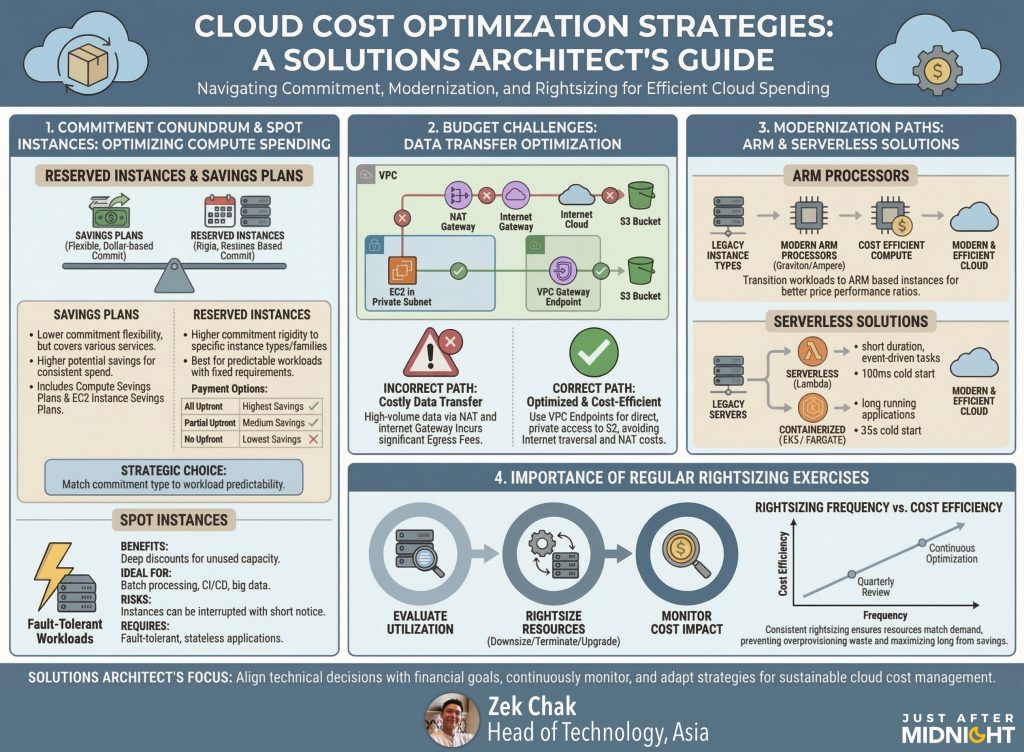
The “Commitment” Conundrum: Savings Plans vs. RIs
We all know that committing to usage saves money. But the nuance here is often where budgets go to die.
Reserved Instances (RIs) are the old guard. They offer deep discounts, but they are rigid. I’ve seen teams buy RIs for a specific instance family (like m5.large on AWS) only to realize six months later that their application runs better on c6g (Graviton). Suddenly, they are stuck paying for capacity they don’t want while buying new capacity at on-demand rates. It’s like having a gym membership for a gym across town while paying drop-in rates at the one next door.
Savings Plans (SPs) are generally the better default for modern workloads because they commit to spend (e.g., $10/hour) rather than specific hardware. However, the “gotcha” here is over-commitment. A common error is looking at your peak usage (like during Black Friday/Cyber Monday) and buying a Savings Plan to cover 80-90% of that. When traffic drops back to normal in February, you are still paying that committed hourly rate for compute you aren’t using.
The fix: Layer your commitments. Buy a conservative Savings Plan that covers only your absolute “floor” baseline usage – the capacity you use at 3 AM on a Sunday. Let Spot Instances or On-Demand cover the variable peaks.
The Silent Budget Killers: Data Transfer & NAT Gateways
If there is one line item that consistently surprises engineering leads, it is Data Transfer.
In the cloud, moving data is rarely free. A classic architecture pattern is putting everything in private subnets for security. This is best practice, but it requires a NAT Gateway to talk to the internet (even for things like pulling Docker images or patching OS packages).
The trap? NAT Gateways on AWS charge an hourly fee plus a per-GB processing fee. We recently audited a customer who had high-volume data processing jobs running in a private subnet, pushing terabytes of data to S3. Because they weren’t using a VPC Endpoint (Gateway Endpoint for S3), all that traffic went through the NAT Gateway. They were effectively paying a tax on every gigabyte that left their subnet.
Similarly, Cross-AZ traffic is a stealthy cost. High-availability is great, but if your application is chatty and sends huge payloads between App Server A in Zone 1 and Database B in Zone 2, you are paying for every packet that crosses that invisible line.
The “Peak Load” Fallacy and Modernization
There is a pervasive habit in traditional VM-based environments to size infrastructure for the worst-case scenario. I call this the “BFCM Hangover.”
Engineers provision instances big enough to handle Black Friday/Cyber Monday traffic, and because rightsizing is risky and requires downtime, those 4xlarge instances stay running all year round. You end up paying for November’s traffic in April.
This is where modernization becomes a financial strategy, not just a technical one.
- Graviton (ARM) & Ampere – If you are running open-source software (Linux, Java, Python, Node.js), moving to ARM-based processors (AWS Graviton or Azure Cobalt) is often the single most impactful “quick win.” You typically get 10-20% better performance for 20% less cost. It’s rarely a simple “reboot,” but for containerized workloads, it’s close.
- Serverless (FaaS) – For truly inconsistent workloads – like a daily report generator or a webhook listener—even a small VM is a waste. This is where true “Serverless” shines (AWS Lambda, Azure Functions). You pay per millisecond of execution, scaling to zero when idle. It requires architectural changes but kills idle cost entirely.
- Containerized (Fargate/EKS/ACA/AKS) – Sometimes you need long-running processes but hate managing servers. AWS Fargate and Azure Container Apps are “serverless containers”—they abstract the underlying OS and patching, but operationally they behave more like “managed containers” than pure functions. You still pay for vCPU/RAM per second the task runs, not per request. The cost win here isn’t usually raw compute savings (Fargate can be pricier than EC2), but the elimination of operational overhead and “bin packing” waste – you stop paying for the empty space on your worker nodes, it’s easy to configure autoscaling based on CPU utilisation or network traffic, and tasks scale out more quickly than VMs typically can.
Regular Rightsizing Exercises
Cost optimization isn’t a project; it’s a hygiene habit.
I recommend quarterly rightsizing reviews. Look at your CPU and Memory utilisation metrics, not just averages but maximums. If an instance hasn’t peaked above 40% CPU in the last 90 days, it is oversized.
- Trust the Advisor tools: AWS Compute Optimizer and Azure Advisor are getting surprisingly good at this. They use machine learning on your actual history to tell you, “You are running an m5.xlarge, but you’d save $50/month on an m5.large with no performance risk.”
- Hunt the Zombies: Look for “Unattached EBS Volumes” (hard drives that exist but aren’t plugged into a computer) and “Idle Load Balancers.” These are the digital equivalent of leaving the lights on in an empty house.
The goal isn’t just to spend less; it’s to ensure that every dollar spent is actually delivering value to the customer. If you treat your cloud bill as a crucial business feedback loop rather than a utility bill, you’ll find it tells you exactly where your architecture needs to improve.
Further reading
Here are a couple of articles you might also find interesting.
Developer made one wrong click and sent his AWS bill into the stratosphere – https://www.theregister.com/2025/11/17/who_me/
Microsoft Pricing Is Changing – And It Will Impact Your Budget – https://www.linkedin.com/pulse/microsoft-pricing-changing-impact-your-budget-qualidev-67rzf/
Case Study: A Startup’s $450,000 Google Cloud Bill – https://openmetal.io/resources/blog/case-study-450k-gcp-public-cloud-bill/
How we can help
At Just After Midnight, we work with brands every day to make their cloud spend as efficient as their delivery pipelines.
From managed cloud services and cost optimization reviews to continuous monitoring and round‑the‑clock support, we’ll help you get control of your cloud bills and keep your business running smoothly.
To see how we could help you reduce waste and modernise with confidence, just get in touch.