







In November 2025, Amazon Web Services (AWS) launched flat-rate pricing for CloudFront – bundling CDN, WAF, DDoS protection, DNS, and edge compute into a single monthly bill with no overages.
Hundreds of thousands of customers adopted the plans within months.
For teams already running on AWS, this narrows the gap with Cloudflare’s bundled model considerably. And it makes the ‘Cloudflare or CloudFront?’ question harder to answer.
The problem is that most comparison pieces you find online still treat this as a CDN shootout. Feature table. Pricing table. ‘Choose Cloudflare if you want simplicity; choose CloudFront if you’re on AWS.’
This framing misses the point. In practice, many production architectures use both: Cloudflare handling DNS, DDoS and caching at the edge while AWS handles origin compute, databases and VPC-bound services behind it.
The question isn’t which one wins. It’s which pattern fits your stack.
This guide is for engineering and platform leads running applications on AWS who are evaluating whether to add Cloudflare, replace AWS-native edge services, or stick with CloudFront
We’ll cover three architecture patterns with gains and losses for each, as well as a few prompting questions to help get you started on your decision.
What you’re actually choosing between
This is not a like-for-like comparison. AWS is a full cloud platform. Cloudflare is an edge network with an expanding compute and storage layer.
They overlap in specific areas – and those overlaps are where the decision sits.
The services that compete directly (depending on your stack) are:
- CDN: CloudFront vs. Cloudflare CDN
- DNS: Route 53 vs. Cloudflare DNS
- Edge compute: Lambda@Edge / CloudFront Functions vs. Cloudflare Workers
- WAF: AWS WAF vs. Cloudflare WAF
- Object storage (the least edge-y): S3 vs. R2
- DDoS protection: AWS Shield vs. Cloudflare DDoS
| Service | Cloudflare | AWS equivalent | When combined |
|---|---|---|---|
| CDN | Cloudflare CDN | CloudFront | CF caches at edge; remove CloudFront unless you need OAC for private S3 |
| DNS | Cloudflare DNS | Route 53 | CF for speed; Route 53 only for advanced routing policies |
| WAF | Cloudflare WAF | AWS WAF | CF for broad edge filtering; AWS WAF for application-specific rules |
| Edge compute | Workers | Lambda@Edge | Workers for lightweight edge logic; Lambda for heavy compute + AWS SDK |
| Storage | R2 | S3 | R2 for egress-heavy; S3 when you need Glacier, triggers, analytics |
| DDoS | Unmetered, all plans | Shield Standard / Advanced | CF absorbs attacks at edge before traffic reaches AWS origin |
| Pricing | Flat-rate bundles | Usage-based or flat-rate (Nov 2025) | CF for unlimited bandwidth; AWS flat-rate competitive if traffic fits allowances |
Everything else – EC2, RDS, VPCs, IAM, SageMaker, the rest of AWS’s 240+ services – has no Cloudflare equivalent. Cloudflare does not replace your cloud. It replaces, or sits in front of, your edge layer.
That distinction leads to three architecture patterns.
Pattern 1: Cloudflare replaces AWS-native edge services
In this pattern, you move DNS, CDN, WAF and edge compute to Cloudflare. Your origins stay on AWS. CloudFront, Route 53 and AWS WAF are removed from the stack.
When this works:
- You operate across multiple cloud providers or want to avoid tighter AWS lock-in at the edge
- Your applications are primarily web-facing – static sites, SaaS frontends, APIs – and don’t depend heavily on CloudFront’s native integration with S3 or ALB
- Your team values a single dashboard for edge configuration over the granularity of separate AWS services
What you gain:
- Simpler billing. Cloudflare’s paid plans bundle CDN, DNS, WAF, DDoS and bot management at a flat rate
- No per-request WAF charges, no per-query DNS charges, no data-transfer-out line items. For bandwidth-heavy workloads, this can be significantly cheaper
- A single control plane. DNS, caching rules, WAF policies, Workers and page rules all live in one dashboard or API. Fewer moving parts, fewer misconfigurations between services
What you lose:
- Free data transfer between AWS services and CloudFront. When CloudFront serves content from S3 or an ALB, that origin-to-edge transfer costs nothing. Remove CloudFront and you start paying AWS egress rates on traffic from your origin to Cloudflare’s edge
- Route 53’s advanced routing policies. Weighted routing, latency-based routing, geolocation routing and failover with health checks – these are Route 53 features with no direct Cloudflare DNS equivalent. If your architecture depends on DNS-level traffic management across multiple AWS regions, replacing Route 53 is harder than it looks
- Deep CloudFront integration with AWS services. Origin Access Control for S3, VPC origins, field-level encryption and Lambda@Edge’s native access to the AWS SDK – these disappear when you remove CloudFront
Pattern 2: Cloudflare in front of AWS
This is the hybrid architecture. Cloudflare handles DNS, DDoS absorption, CDN caching and edge logic. AWS handles everything behind the edge – compute, databases, VPCs, managed services. Traffic flows from user to Cloudflare edge to your AWS origin.
When this works:
- You need Cloudflare’s edge security – managed WAF rulesets and bot management – but your application data must stay in AWS VPCs
- You want to reduce or eliminate CloudFront egress costs on high-bandwidth workloads
- You front multiple origins (perhaps across AWS regions or accounts) from a single edge. You want to run lightweight logic at the edge with Workers while keeping heavier processing in Lambda or ECS
What you gain:
- Cloudflare’s security layer without leaving AWS. You get managed WAF rulesets and bot management at the edge, while your application data stays in AWS VPCs. For high-bandwidth workloads, removing CloudFront from the path eliminates origin-to-CloudFront egress costs
- A single edge for multiple origins. You can front origins across AWS regions or accounts from one Cloudflare zone, with DNS, caching and WAF policies managed in a single control plane
- Lightweight edge compute alongside heavier AWS processing. Workers handles auth checks, header manipulation, A/B routing and API proxying at the edge. Lambda or ECS handles the heavy lifting behind it
What you lose:
- Free origin-to-CloudFront data transfer. The same trade-off as Pattern 1, once CloudFront is out of the path, you pay AWS egress rates from your origin to Cloudflare’s edge
- CloudFront’s native integration with private AWS resources. If you use Origin Access Control to serve private S3 content, you’ll need to keep CloudFront in the path for that specific distribution. VPC origins for private ALBs also require CloudFront
- Latency reduction on uncacheable requests. Cloudflare accelerates cached content delivery and absorbs attacks, but it does not eliminate origin latency for dynamic or authenticated requests. If your application makes chatty API calls to a specific AWS region, users far from that region still pay the round-trip. Consider Workers or Argo Smart Routing for those paths
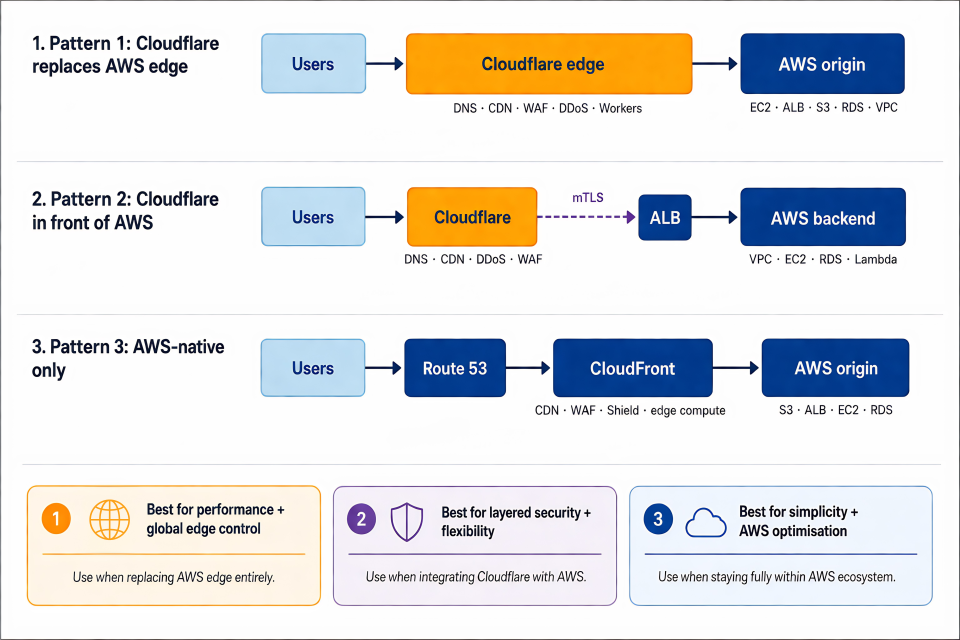
Pattern 3: AWS-native only
In this pattern, you use CloudFront, Route 53, AWS WAF and Shield as your edge stack. Cloudflare is not in the picture.
When this works:
- Your entire stack is AWS. Your traffic patterns are primarily AWS-to-AWS – serving from S3, fronting ALBs, distributing from regional origins.
- You depend on Route 53’s routing policies for multi-region failover or latency-based routing
- You operate in a regulated environment where a single-vendor audit surface simplifies compliance. Your team already has deep AWS operational expertise and doesn’t want to manage a second control plane
What you gain:
- Zero data transfer between AWS origins and CloudFront
- Tight integration across services – CloudFront, WAF, Shield, Route 53, S3 and Lambda@Edge all managed through the same console, CLI and IaC tools. Origin Access Control for private S3 content. VPC origins for private ALBs. Field-level encryption. And no second vendor relationship.
- Predictable pricing with flat-rate plans. The new flat-rate tiers – Free ($0/month), Pro ($15/month), Business ($200/month), Premium ($1,000/month) – bundle CDN, WAF, DDoS protection, Route 53 DNS, CloudWatch log ingestion, edge compute and S3 storage credits into one price with no overages
- Blocked DDoS attacks and WAF-rejected requests don’t count against your usage allowance. For teams whose traffic fits within the allowances (up to 50 TB and 500 million requests/month per distribution before you need custom pricing), the AWS-native stack now offers cost predictability without leaving the ecosystem
What you lose:
- Edge performance for globally distributed audiences. CloudFront’s network is large (750+ PoPs as well as many embedded ISP locations), but Cloudflare’s Anycast architecture across 330+ cities in 125+ countries typically delivers lower time-to-first-byte for globally distributed audiences. Independent benchmarks consistently show Cloudflare’s median latency is 20–30% better for general web traffic. For AWS-origin workloads specifically, that gap narrows – but it exists
- A simpler security control plane. On Cloudflare, WAF rulesets, bot management, rate limiting and DDoS protection are configured from a single dashboard across all plans. On AWS, equivalent capabilities are spread across WAF, Shield and CloudFront
- Flexibility if you exceed your plan’s allowances. CloudFront’s flat-rate usage allowances are not hard limits – AWS throttles performance (serving from fewer or more distant edge locations) rather than billing overages. If your traffic exceeds the plan’s allowance for two to three consecutive months, AWS may adjust your service. Right-sizing matters
How to decide
Start with three questions:
Where do your origins live?
If everything is in AWS and you have no plans to go multi-cloud, the AWS-native stack (pattern 3) is the path of least resistance – especially with flat-rate pricing. If your origins span multiple providers, Cloudflare (patterns 1 or 2) gives you a single edge layer that’s cloud-agnostic.
What does your security posture require?
If you want edge security managed from a single control plane – WAF, bot management, rate limiting, all configured in one dashboard – Cloudflare keeps that simpler. If you need a single-vendor audit surface with deep IAM integration, AWS keeps the compliance story simpler.
How does your team prefer to work?
Cloudflare’s single dashboard and Wrangler CLI appeal to teams that want edge configuration in one place. AWS’s distributed service model appeals to teams already fluent in CloudFormation, Terraform and the AWS console.
There is no wrong answer – only a wrong fit. The strongest production architectures pick the pattern that matches their operational reality, not the one that wins a feature comparison.
If you’re weighing this decision now
Configuring Cloudflare alongside AWS – or deciding whether you should – is exactly our wheelhouse.
As an AWS Advanced Consulting Partner with a specialism in Cloudflare managed services, we’re perfectly placed to help readers of this blog (and anyone else comparing these two platforms) get the edge layer just right.
For a deeper dive on Cloudflare, you could try our piece on Workers vs. Pages.
Or if you want to talk through anything else, just get in touch.