







Amazon Bedrock and Amazon SageMaker are two ways users can access AI capabilities. Though both are integrated into SageMaker Unified Studio as of March 2025, these are still fundamentally different tools.
In this piece, we look at:
- What Amazon Bedrock and SageMaker are
- How the integration in SageMaker affects things
- And then we’ll compare them on model access, customisation depth, cost, build patterns, and deployment and operations
Let’s get started.
What is Amazon Bedrock?
The key concept
Amazon Bedrock is a managed service for AWS, allowing users to connect to AI models.
An AWS VP, Dr. Swami Sivasubramanian, described Bedrock as ‘democratising generative AI innovation at scale.’
That’s because it essentially allows low-barrier connection to foundation models: it’s AI on-demand via API.
Users of Bedrock who want to incorporate Claude, Llama or AWS’s own models into their workflows can do so without provisioning or managing complex GPUs.
Who is Bedrock for?
Bedrock is ideal for smaller teams who want to access AI quickly.
Example Bedrock use case
A lean LegalTech start-up is launching an MVP to help firms scan procurement contracts for predatory clauses.
They chose Bedrock because, with Amazon Bedrock’s serverless experience, it offers instant access to high-reasoning models like Claude Opus 4/Claude Sonnet 4 via a single API. This allows their three-person team to ship a production-grade risk-detection engine in weeks without hiring ML engineers or managing servers, focusing their limited capital entirely on user experience and rapid market entry to beat larger competitors.
What is Amazon SageMaker?
The key concept
Amazon SageMaker is a platform for building, training and deploying AI models, including fine-tuning or training LLMs from scratch and deploying them as managed endpoints.
Dr. Sivasubramanian says that SageMaker ‘simplifies the machine learning lifecycle by integrating data preparation, model training, deployment, and observability into a unified platform.’
This is because SageMaker allows you to deploy and manage the infrastructure that either foundation/custom models or user-created models run on, allowing developers to inject proprietary code into managed Docker containers to perform advanced training techniques like supervised fine-tuning, hyperparameter optimisation, and reinforcement learning directly against their own private datasets.
Who is SageMaker for?
More mature teams that need to customise and scale generative AI applications. These teams often feature dedicated data scientists who’re able to take advantage of SageMaker’s flexibility.
Example SageMaker use case
The same LegalTech product has now reached maturity. Scanning millions of pages via Bedrock became prohibitively expensive, and API latency fluctuated during peak court cycles. By investing in an MLOps team, they migrated to SageMaker to host a fine-tuned, quantised Llama model on dedicated GPU instances. This shift slashed their per-document processing costs by 45% and allowed for custom pre-processing logic that halved false-positive risk detections compared to the generic API.
How does the 2025 unification in SageMaker Unified Studio affect the comparison?
What actually changed in March 2025
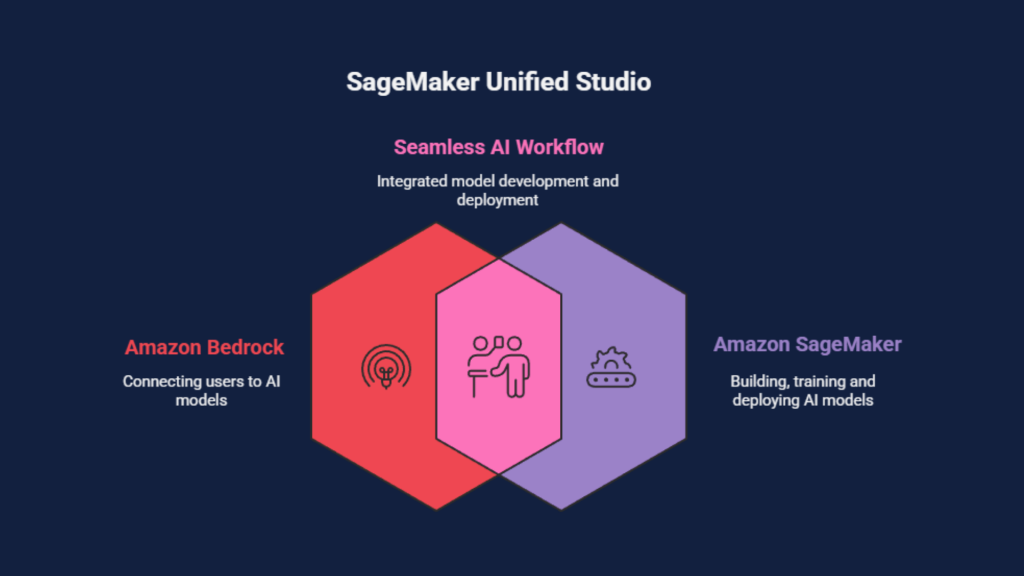
AWS brought Amazon Bedrock and Amazon SageMaker into a single working environment via SageMaker Unified Studio. Instead of treating them as separate product surfaces, you can now access both from the same Studio-style workspace, under the same project structure.
What this means for readers
For teams evaluating Amazon Bedrock vs SageMaker, this mainly removes some of the tooling split that older comparisons assume. You’ll see similar navigation, shared workflows, and a more consistent path from experimenting with foundation models to operationalising machine learning models, all without jumping between multiple places in AWS.
1. Model access and model selection
Amazon Bedrock: selecting from supported foundation models
Amazon Bedrock is a managed layer for calling foundation models through a single API. Model selection is choosing a provider and model ID from the Bedrock-supported list. That list includes providers such as Amazon (Nova), Anthropic (Claude), Meta (Llama), Mistral, Cohere, AI21 Labs, and Stability AI, with availability varying by AWS Region.
Amazon SageMaker: selecting foundation models or your own training path
Amazon SageMaker also supports foundation models through SageMaker JumpStart, including publicly available models and some third-party offerings. Selection in SageMaker can also mean choosing to fine-tune an existing model, or running full model training for custom models, then deploying the fine-tuned model artefact, such as a custom LLM or other machine learning model, as a managed endpoint for production inference.
2. Customisation depth
Amazon Bedrock
Prompting and orchestration
Behaviour changes without changing model weights. This includes prompt templates, system instructions, tool use, and guardrails.
Example
A support team tightens a Claude-based chatbot’s tone and refusal behaviour using system prompts and guardrails, without touching training.
Fine-tuning
Bedrock supports fine-tuning for certain supported foundation models via managed jobs. Compared with SageMaker, the difference is operational: Bedrock abstracts the training infrastructure and exposes a narrower, service-managed workflow.
Continued pre-training and reinforcement fine-tuning
Bedrock includes managed options beyond basic fine-tuning, such as continued pre-training and reinforcement fine-tuning (where supported). These are still Bedrock-native jobs rather than custom training pipelines you control end-to-end.
Customisation options are model-dependent; not every model supports every method in Bedrock.
Custom model import
Bedrock can host imported, customised versions of supported models, keeping Bedrock’s serving layer while the weights were produced elsewhere.
Example
A team fine-tunes a Llama variant outside Bedrock, then imports it so their app can call it through the same Bedrock runtime used for other foundation models.
Amazon SageMaker
Prompting and orchestration
No meaningful difference as a concept. Teams typically implement this at the application layer regardless of whether the model endpoint is Bedrock or SageMaker.
Fine-tuning
SageMaker supports fine-tuning with more control over data prep, training code, evaluation, and repeatability, which matters when tuning needs to sit inside a broader ML workflow.
Example
A LegalTech team fine-tunes Llama on labelled clauses in SageMaker, runs evaluation, and version-controls the artefact before deployment.
Full model training for custom models
SageMaker supports full training runs for custom models, including training from scratch, custom architectures, and specialised optimisation approaches.
Automatic model tuning
SageMaker provides automatic model tuning (hyperparameter optimisation) to run many training trials and select the best configuration.
Example
A team tunes batch size and learning rate across dozens of training jobs to reduce inference cost while holding accuracy steady.
3. Cost modelling and pricing

Amazon Bedrock
Cost type: on-demand inference
This is the default part of Amazon Bedrock’s pricing model. You pay per 1,000 input tokens and per 1,000 output tokens, with rates set by the specific foundation model.
Cost type: provisioned throughput
You reserve capacity and pay hourly while it is provisioned. This is independent of how many requests you actually send.
Cost type: customisation jobs and storage
If you fine-tune supported models in Bedrock, pricing includes training (per tokens trained) and a monthly storage charge for each custom model.
Example
A small team ships an MVP on Llama 2 Chat (13B) and keeps costs elastic while demand is still uncertain. On-demand pricing is $0.00075 per 1,000 input tokens and $0.001 per 1,000 output tokens.
At ~8,000 requests/day (900 input tokens, 250 output tokens on average), that is roughly 216M input tokens and 60M output tokens per month. The model spend comes to about $162/month for input and $60/month for output, roughly $222/month total, and it falls automatically in quieter weeks.
Amazon SageMaker
Cost type: training compute
Training is billed by the instance type and runtime for training jobs, plus associated storage.
Cost type: real-time hosting
When teams deploy machine learning models to a real-time endpoint, cost is primarily the hosting instance type and how long the endpoint runs. AWS’s current pricing shows ml.g5.2xlarge at $1.52 per hour for LLM hosting in us-east-1.
Cost type: evaluation and supporting jobs
SageMaker also charges for evaluation and processing jobs, which can be material if you run them frequently.
Example (SageMaker, one cost type: real-time endpoint hosting)
A more mature product needs predictable latency during court-cycle peaks and prefers dedicated capacity over usage-based variability, so it runs an always-on endpoint on ml.g5.2xlarge. Using the $1.52/hour figure from AWS’s current pricing, that is about $36.48/day and roughly $1,109/month (730 hours), before scaling or add-ons.
4. Build patterns that change the decision
Retrieval augmented generation and knowledge bases
Amazon Bedrock
Bedrock Knowledge Bases are designed for retrieval augmented generation, where your application retrieves relevant passages from your own data and supplies them to a foundation model at request time.
Example
A LegalTech assistant answers questions about a client’s contract library by retrieving clause excerpts first, then generating the response with citations.
Amazon SageMaker
SageMaker is typically used here when the retrieval side is treated as an ML problem, for example, training or tuning embedding models, rerankers, or other components that sit around the language model, then deploying them as endpoints. SageMaker JumpStart also supports foundation models for information-retrieval-style use cases.
Text generation and natural language processing
Amazon Bedrock
Bedrock is commonly used when text generation is driven by selecting a supported foundation model and integrating it into an application workflow, with prompting and guardrails handled at the app layer.
Amazon SageMaker
SageMaker JumpStart provides foundation models for use cases including content writing and summarisation, and it also supports broader natural language processing workloads such as classification and question answering as part of an ML workflow.
Code generation workflows
Amazon Bedrock
Bedrock supports code generation through supported language models exposed via its API, which suits teams integrating code assistance into internal tools without managing hosting.
Amazon SageMaker
JumpStart explicitly lists code generation as a supported foundation model use case. This is often paired with private endpoints and evaluation workflows before rollout.
Example
An engineering team deploys a code model endpoint for internal use so prompts and outputs stay inside their AWS environment.
Image generation
Amazon Bedrock
Bedrock supports image generation through Stability AI models, including Stable Image and Stable Diffusion model families made available in Bedrock.
Example
A marketing team generates compliant campaign variants (layout, product backgrounds) from approved prompts without running GPU infrastructure.
Amazon SageMaker
SageMaker is the typical choice when the image pipeline requires training or fine-tuning vision models, or when you need to run custom pre-processing and post-processing as part of a managed deployment workflow.
Predictive analytics and classical ML
Amazon Bedrock
Bedrock is not aimed at training classical predictive models. If the core workload is forecasting, classification, or regression on tabular data, Bedrock is usually a supporting component rather than the platform.
Amazon SageMaker
SageMaker is built for predictive analytics workflows, including training with built-in algorithms such as XGBoost, and deploying the resulting models as managed endpoints.

5. Deployment and operations
Amazon Bedrock
Model deployment
Bedrock inference is consumed through runtime APIs. There is no separate endpoint fleet to provision for Bedrock-hosted foundation models.
Scaling and infrastructure management
Capacity is largely abstracted. Provisioned Throughput is the main lever when predictable capacity is required, and it is billed while provisioned until removed.
Monitoring
Operational monitoring typically focuses on application-level observability for Bedrock calls (latency, errors, request volume, throttling, and token usage/cost) and controlled quality evaluation workflows. Bedrock doesn’t provide a first-party drift/quality monitoring product equivalent to SageMaker Model Monitor; teams usually implement quality evaluation and operational dashboards around their Bedrock usage.
Amazon SageMaker
Model deployment
SageMaker provides multiple deployment modes, including real-time endpoints, serverless inference, asynchronous inference, and batch transform, selected based on latency, throughput, and traffic shape.
Scaling and infrastructure management
Deployment requires explicit choices around serving mode, instance sizing, and scaling configuration. AWS manages underlying infrastructure, while teams define the operational configuration that drives cost and performance.
Monitoring
Alongside standard endpoint observability (latency/errors), SageMaker Model Monitor can track drift and quality signals when configured with baselines and data capture, producing reports that teams use to inform retraining and rollback decisions.
Hybrid workflow (SageMaker Unified Studio)
SageMaker Unified Studio reduces friction when a single project uses both services. Common hybrids include using Bedrock for early delivery with hosted foundation models, then introducing SageMaker for dedicated deployment modes, formal monitoring, or deploying custom models, while keeping work in the same Studio environment.
6. Personas: who uses what

Software development teams
These teams usually adopt Bedrock first when the goal is to ship generative AI features quickly using foundation models, without taking ownership of training infrastructure. SageMaker becomes relevant when the same product needs dedicated deployment patterns, tighter control over latency, or a path to deploying custom models inside a broader engineering workflow.
Data scientists and ML engineers
Teams with dedicated data scientists tend to default to Amazon SageMaker AI for work that resembles a full machine learning workflow: dataset preparation, experiments, repeatable training runs, and production hardening. Bedrock is still used in these organisations, but more often as a managed route to foundation models for evaluation, prototyping, or standardised GenAI building blocks.
Platform, security, and operations teams
These groups care less about model choice and more about operational consistency: access control, project structure, auditability, and cost allocation. SageMaker Unified Studio reduces friction here by making Bedrock and SageMaker usage visible within the same workspace and governance patterns, even when different teams own different parts of the solution.
Hybrid ownership model
A common split is application teams owning Bedrock integration and prompt-level changes, while ML teams own fine-tuning, training, and deployment decisions in SageMaker. SageMaker Unified Studio makes that split easier to operate without forcing a single team to own the entire stack.
How we can we help
At Just After Midnight we help teams from start-ups to enterprises get the most from AWS. As AWS Advanced Partners, we’re perfectly placed to help you build gen AI into your solution, ensure your platform stability with our signature 24/7 support service or answer any other questions you may have.
To find out how we could help you, just get in touch.